---
component: python
version: "0.10"
slug: python/index
canonical_url: "https://docs.gradle.com/develocity/python/0.10/"
title: "Getting Started With Develocity for Python Users (Beta)"
description: "How to get started with Develocity for Python."
keywords: []
status: current
---
> Canonical:
# Getting Started With Develocity for Python Users (Beta)
Beta Feature
This guide covers how to get started with Develocity, with topics such as strategies for incrementally introducing Build Scan® usage, and key Build Scan features for improving your development productivity.
Develocity provides [Build Scan](#build-scan), a permanent and shareable record of an executed build that allows collaborative troubleshooting and optimization.
> [!NOTE]
> Python support isn’t enabled by default with Develocity. If you want to use Python with Develocity, contact your customer success representative.
* * *
## Installation
This guide doesn’t cover installation of Develocity. Consult one of the following installation manuals for help with installation:
* [Self-Hosted Kubernetes Installation Guide](https://docs.gradle.com/develocity/2026.1/installation/kubernetes-installation/)
* [Self-Hosted Standalone Installation Guide](https://docs.gradle.com/develocity/2026.1/installation/standalone-installation/)
* [Amazon EKS Kubernetes Installation Guide](https://docs.gradle.com/develocity/2026.1/installation/aws/aws-eks-cluster/)
* [Amazon EC2 Standalone Installation Guide](https://docs.gradle.com/develocity/2026.1/installation/aws/aws-ec2-standalone/)
* [Azure AKS Kubernetes Installation Guide](https://docs.gradle.com/develocity/2026.1/installation/azure/azure-aks-cluster/)
* [Azure VM Standalone Installation Guide](https://docs.gradle.com/develocity/2026.1/installation/azure/azure-vm-standalone/)
* [Google GKE Kubernetes Installation Guide](https://docs.gradle.com/develocity/2026.1/installation/google-cloud/gke-kubernetes/)
* [Google Compute Engine Standalone Installation Guide](https://docs.gradle.com/develocity/2026.1/installation/google-cloud/gce-standalone/)
The remainder of this guide will assume that your installation has a public hostname of `develocity.example.com` and has enabled HTTPS.
### Develocity Python Agent
To use Build Scans, you must apply the [Develocity Python agent](https://docs.gradle.com/develocity/python/0.10/python-agent/) to your project.
#### Setup
The Develocity Python agent is a Python package, but it isn’t publicly available on PyPI. To install it in your virtual environment, you can use the command line below.
```shell
pip install https://develocity-python-pkgs.gradle.com/develocity_agent-0.10-py3-none-any.whl
```
Alternatively, you can add the Develocity Python agent directly in your `requirements.txt` file (or equivalent):
**requirements.txt:**
```
https://develocity-python-pkgs.gradle.com/develocity_agent-0.10-py3-none-any.whl
```
> [!TIP]
> To instrument Poetry runs, you can add the Develocity Python agent to Poetry’s own environment with the following command: Note that this won’t instrument the tools executed by Poetry, only the Poetry commands themselves. To instrument the tools executed by Poetry, install the Develocity Python agent in your requirements.txt file (or equivalent).
> [!TIP]
> Python support needs to be enabled in your license to use the Develocity Python agent. Reach out to us to enable Python support.
After installing the agent, you can use it in your Python runs.
Publishing a Build Scan to [Develocity at gradle.com](https://gradle.com/scans/gradle/) isn’t supported. The minimum configuration required is the Develocity server URL.
The agent is configured through a file named `.develocity.py` which should be located at root of your Python project. The configuration file must define a function called `develocity_configuration` which takes as parameter the current configuration and returns the updated configuration. Following is an example of minimal configuration:
**.develocity.py:**
```
def develocity_configuration(configuration):
configuration.develocity_url = 'https://develocity.example.com'
return configuration
```
More detailed information about the Develocity Python agent can be found in the [Develocity Python agent user manual](https://docs.gradle.com/develocity/python/0.10/python-agent/).
## Build Scan
Build Scans are a significant innovation in software build tooling. Having centralized and shareable records providing fine-grained details and insights of all builds, including local development builds, enables new levels of collaborative debugging and optimization.
### Quick Start
Build Scans are automatically enabled for all builds, when applying the Develocity Python agent. As the build completes, the last lines of output will be similar to:
**Output:**
```
....
Publishing Build Scan to Develocity...
https://develocity.example.com/s/3z475bz247h5g
....
```
Follow that link to view your Build Scan.
### Build Scan Highlights
This section calls out a subset of the things that you can do with Build Scans.
#### Find and View Any Build Scan
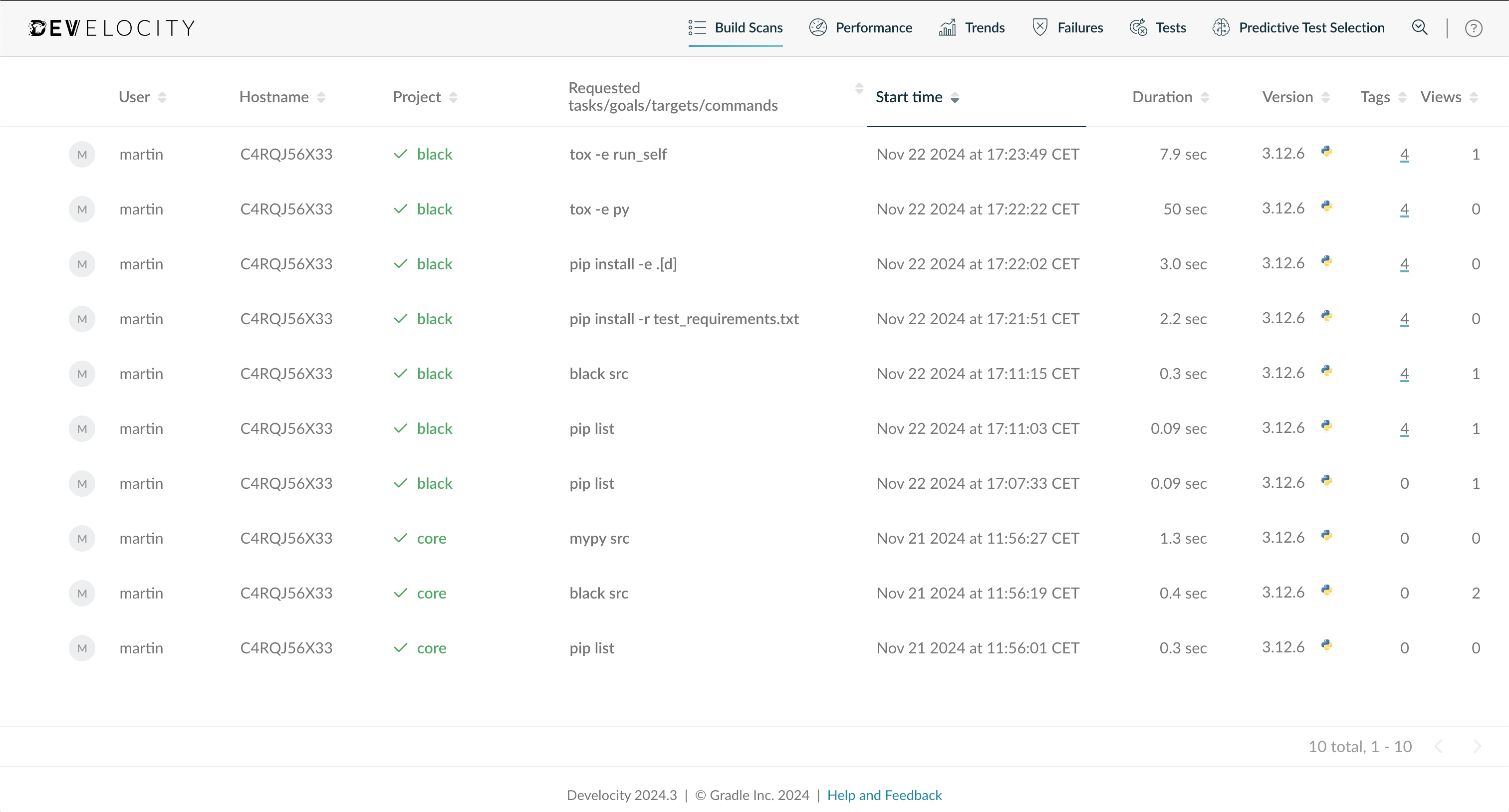
Search through all the captured Build Scans by going to `https://develocity.example.com/scans`.
Build Scan Overview
This view allows searching by various criteria, including top-level project name, username, build outcome, build start time and more. By default, the list is sorted to show the most recent scans first.
Beyond looking for a particular Build Scan, the listing can provide new insights into the actual builds being run at your organization and by your colleagues. You might find occurrences of previously unknown errors with your build, or that the build is taking longer in certain cases than you expected, or that certain build users are executing more goals than they need to and are therefore subjecting themselves to more build time than they need to, and other previously unknown behaviors.
#### Inspect Console Log
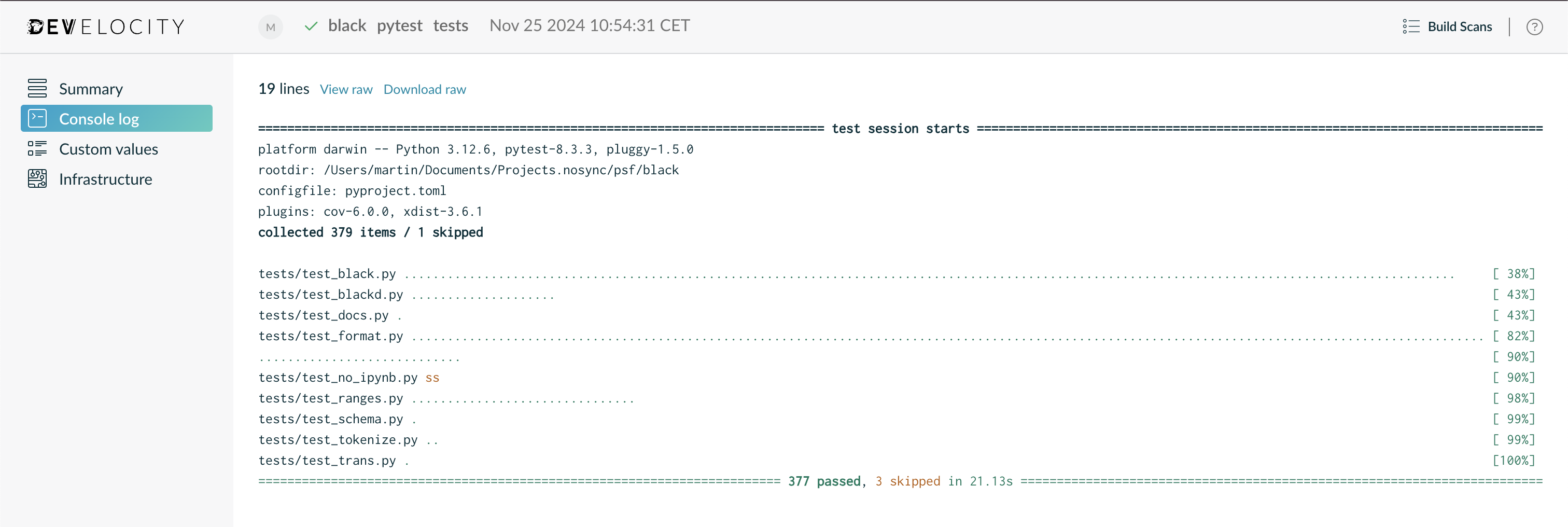
The console log will be included in your Build Scan. Use the left navigation menu to visit the `Console Log` section.
Console Log Overview
This section will display all the console log emitted by the Python run, except the logs produced by processes forked from Python.
#### Inspect Test Results
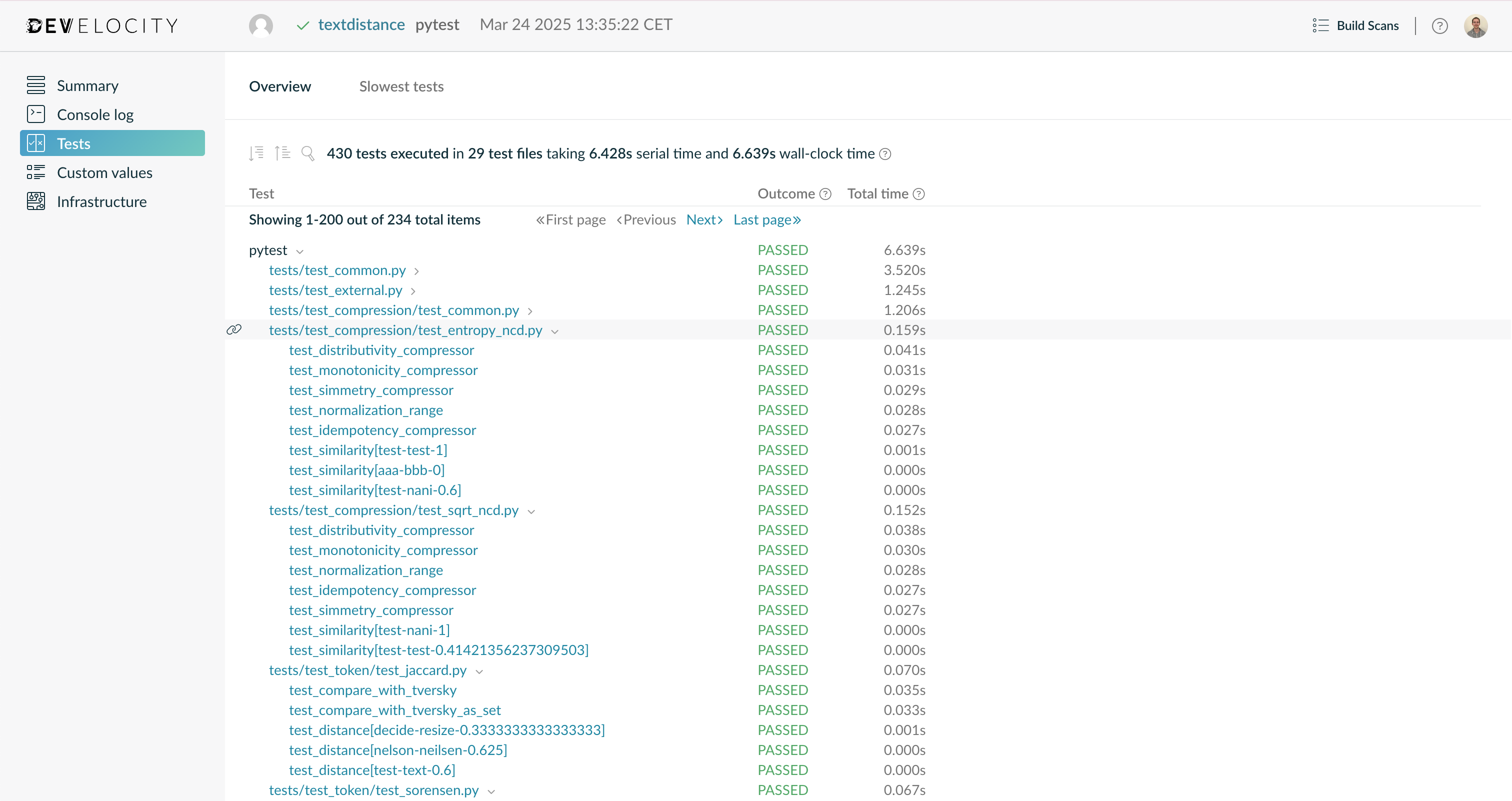
If your build executed tests, their results will be included in your Build Scan. Use the left navigation menu to visit the `Tests` section.
Tests Overview Page
This section shows the results of all the tests that ran during your build, along with their outcome and durations. The results are broken down by _process_, _test file_ and _test case_. Select any _test file_ or _test case_ to see details about each of their individual executions, in case of test retry. The _total time_ is available for _processes_, _test files_ and _test cases_. Generally, it corresponds to the wall clock time that an execution lasted. Please refer to [Viewing test results](https://docs.gradle.com/develocity/python/0.10/python-agent/#viewing-test-results) for more details.
### Next Steps
#### Custom Tags, Values and Links
Build Scans can be enriched with metadata particular to your environment by [several means](https://docs.gradle.com/develocity/python/0.10/python-agent/#extending-build-scans).
Extending your Build Scans with tags, values and links is strongly recommended. In particular:
* VCS information such as commit identifiers, branch names, etc.
* Tags for different types of builds (for example, `CI` vs. `local`)
* Links to CI system record of build for CI builds
This adds useful context to your Build Scans.
### Integrating Your CI Tool
Build Scans are passive with regard to the build process. That’s to say, enabling Build Scans doesn’t affect the outcome or outputs of your build. As such, it’s generally safe to simply add the necessary configuration to your projects to enable sending Build Scans to your Develocity installation and check it in to version control, enabling it for all users of the build.
The Develocity Python agent won’t cause build failures, even when there is no connection available to the Develocity server when trying to publish.
## Getting Help or Asking Questions
If you are currently using Develocity as part of your trial sign-up or license purchase, you will have received instructions on how to access the priority Develocity support channel. If you have any issues with or questions about Develocity, please raise a support request.
Alternatively, or if you aren’t yet using Develocity, you can use our [contact form](https://gradle.com/contact/).
## Keeping Up to Date
Develocity is constantly evolving with regular updates that add new features and capabilities. The monthly [Gradle newsletter](https://newsletter.gradle.org/) is an easy way to stay informed about new releases, features and events.
## Integrating With Gradle
If you run Python through a Gradle task, you might want to use the convenience API we offer through the Gradle Develocity plugin.
Learn more in the [Develocity Python agent user manual](https://docs.gradle.com/develocity/python/0.10/python-agent/#gradle-integration).
* * *
If you have any questions or need any assistance contact the Develocity support team or your customer success representative.