---
component: artifact-cache
version: "1.1"
slug: artifact-cache/index
canonical_url: "https://docs.gradle.com/develocity/artifact-cache/1.1/"
title: "Develocity Artifact Cache CLI User Manual"
description: "Explore the Artifact Cache CLI documentation to learn how to accelerate builds by reducing dependency download and build setup time."
keywords: []
status: current
---
# Develocity Artifact Cache CLI User Manual
## Introduction
Develocity Artifact Cache and Setup Cache enables caching of build dependencies and build inputs required by Gradle, Maven and npm builds. This is especially useful in ephemeral CI environments where build agents are frequently created and destroyed, leading to the loss of local caches between builds.
**Artifact Cache** is designed to eliminate the bottlenecks caused by downloading dependencies from the WAN (Wide Area Network). It acts as an intermediary between your builds and external repositories (such as Maven Central and npm) or internal artifact managers (like Artifactory). To use it, the entitlement `Artifact Cache` must be enabled on your Develocity license.
**Setup Cache** targets the initialization phase of the build, which is often a hidden tax on developer productivity. In a typical "cold" CI run, build tools like Gradle must perform compute-intensive tasks before they even begin executing the build. This includes recompiling build scripts, parsing configurations, calculating file hashes, and rebuilding shared build logic defined in `buildSrc` or included builds. To use it, the entitlement `Setup Cache` must be enabled on your Develocity license.
Develocity Artifact Cache and Setup Cache is delivered as a unified service through Develocity Edges which serve as persistent cache for build artifacts that **Artifact Cache CLI** can later use to restore CI agent state.
## Using Artifact Cache CLI
The Artifact Cache CLI is a command-line tool that stores and restores build artifacts (build dependencies and other build inputs) to the unified Develocity Artifact Cache and Setup Cache service provided by Develocity Edge nodes.
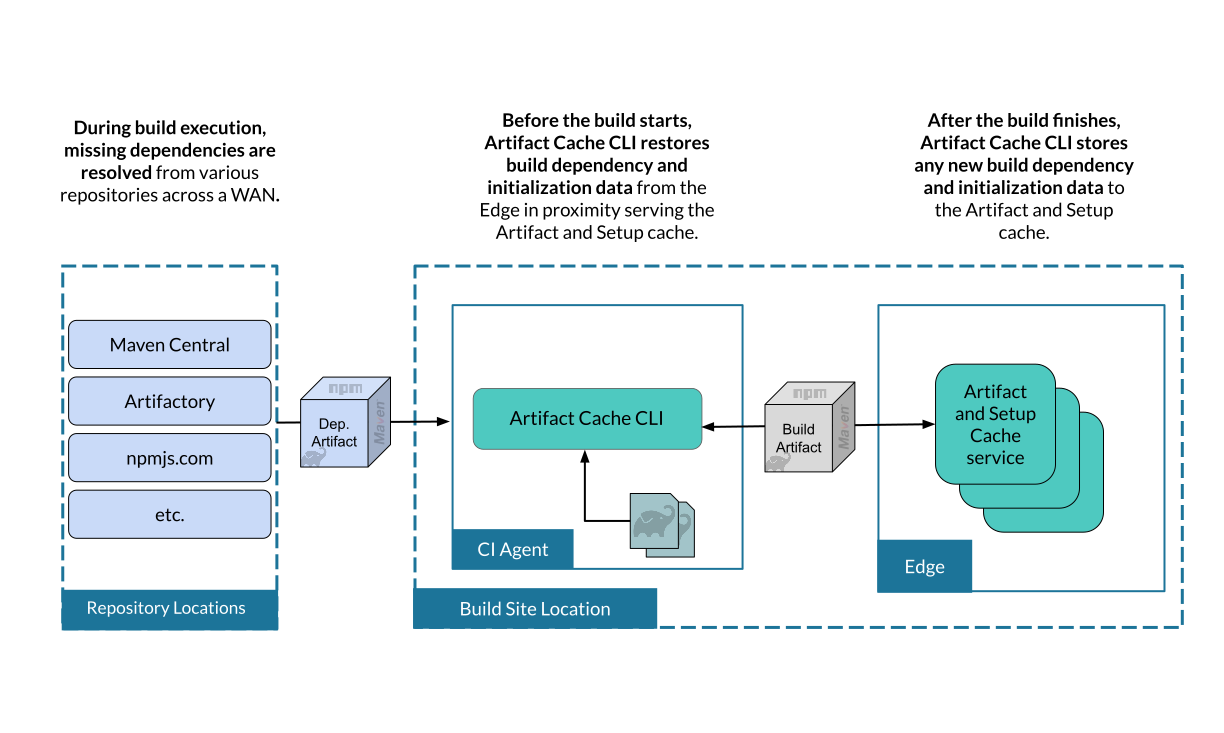
Artifact Cache and Setup Cache Overview
### Key Components
**Artifact Cache CLI** — An application that runs on the CI agent. Handles capture and retrieval of build dependencies and other build inputs to and from the Develocity Artifact Cache and Setup Cache service.
**Edge** — Comprises one or more Edge _nodes_ deployed near CI infrastructure. Each Edge node manages available storage through eviction, stores and retrieves build artifacts to Artifact Cache CLI clients when requested.
**Develocity** — Manages access control and enables Edge discovery for Artifact Cache CLI clients.
**Image** — A metadata file that lists all build artifacts available from the Develocity Artifact Cache and Setup Cache for a specific CI job. Tracked separately for each CI job, branch, and environment.
### Develocity Artifact Cache and Setup Cache Operation Flow
#### Edge Discovery
The Artifact Cache CLI uses [Edge discovery](https://docs.gradle.com/develocity/2026.1/administration/build-acceleration/edge/) to connect to the optimal Edge:
1. Artifact Cache CLI reads the access key of a CI agent Develocity user from the environment variable `DEVELOCITY_ACCESS_KEY`.
2. Access key identifies a Develocity user.
3. The CI agent Develocity user has the Edge location configured.
4. Artifact Cache CLI connects exclusively to that Edge for the **Restore** and **Store** phases.
Alternatively, the `--dv-edge` option can be used to connect directly to a specific Edge node, bypassing automatic discovery.
> [!WARNING]
> The "Preferred location" for the CI agent’s user must be set to one [that doesn’t have Develocity server](https://docs.gradle.com/develocity/edge/2.1/#setting_the_develocity_location_name) in it. A user’s "Preferred location" can be changed in Develocity by logging in as that user and navigating to the "My Settings - Location" page in the right-hand menu.
#### Restore Phase
1. **CI job starts** - Fresh ephemeral CI agent is created.
2. **Checkout code** - Repository is cloned.
3. **Artifact Cache CLI queries Edge** - Requests the image for this job/branch.
4. **Edge returns image** - Lists all known artifacts for this job.
5. **Restore artifacts** - Artifact Cache CLI downloads artifacts.
> [!IMPORTANT]
> If an existing caching solution is leveraged by the ephemeral CI agent, be aware that it might clash with Artifact Cache and/or Setup Cache, potentially causing suboptimal caching performance or undefined behavior.
> [!IMPORTANT]
> The checkout step must be performed before the restore command.
#### Build Phase
1. **Build runs** - The build tool uses the restored artifacts when it runs.
#### Store Phase
1. **Build completes** - The build tool process exits.
2. **Artifact Cache CLI scans directories** - Identifies new or changed artifacts.
3. **Store new artifacts** - Upload to Edge node.
4. **Update image** - Records the up-to-date artifact list.
5. **Image stored to Edge** - Updated image is ready for use by the next CI job.
## Hosting the Artifact Cache CLI Binary
> [!IMPORTANT]
> You must host the Artifact Cache CLI binary within your internal network. This is required for security and reliability.
Download the CLI binary and upload it to your internal artifact repository (such as Artifactory, Nexus, or a simple file server). This approach ensures:
* Control over artifact availability
* Compliance with corporate security policies
* Optimal download speeds
### Download
You can download the latest version of `develocity-artifact-cache-cli` JAR file and its associated files from the following links:
* [JAR file](https://docs.gradle.com/downloads/develocity-artifact-cache-cli/develocity-artifact-cache-cli-1.1.0.jar)
* [JAR file SHA256 checksum](https://docs.gradle.com/downloads/develocity-artifact-cache-cli/develocity-artifact-cache-cli-1.1.0.jar.sha256)
* [JAR file PGP signature](https://docs.gradle.com/downloads/develocity-artifact-cache-cli/develocity-artifact-cache-cli-1.1.0.jar.asc)
* [JAR file PGP signature SHA256 checksum](https://docs.gradle.com/downloads/develocity-artifact-cache-cli/develocity-artifact-cache-cli-1.1.0.jar.asc.sha256)
```shell
curl -L -o develocity-artifact-cache-cli.jar https://docs.gradle.com/downloads/develocity-artifact-cache-cli/develocity-artifact-cache-cli-1.1.0.jar
```
To validate the binary:
1. Download the checksum file:
```shell
curl -L -o develocity-artifact-cache-cli-1.1.0.jar.sha256 https://docs.gradle.com/downloads/develocity-artifact-cache-cli/develocity-artifact-cache-cli-1.1.0.jar.sha256
```
2. Validate the binary against the checksum file:
```shell
echo "$(cat develocity-artifact-cache-cli-1.1.0.jar.sha256) develocity-artifact-cache-cli.jar" | sha256sum --check
```
3. If valid, the output is:
**Output:**
```
develocity-artifact-cache-cli: OK
```
4. If the check fails, `sha256` exits with nonzero status and prints output similar to:
**Output:**
```
develocity-artifact-cache-cli: FAILED
sha256sum: WARNING: 1 computed checksum did NOT match
```
> [!NOTE]
> Download the same version of the binary and checksum.
### Verifying the GPG Signature
The `develocity-artifact-cache-cli` JAR is published alongside its PGP signature. The public key is published to [https://keys.openpgp.org](https://keys.openpgp.org). You can verify the signature as follows:
```shell
curl -OL https://docs.gradle.com/downloads/develocity-artifact-cache-cli/develocity-artifact-cache-cli-1.1.0.jar && \
curl -OL https://docs.gradle.com/downloads/develocity-artifact-cache-cli/develocity-artifact-cache-cli-1.1.0.jar.asc && \
gpg --keyserver keys.openpgp.org --recv-key 7B79ADD11F8A779FE90FD3D0893A028475557671 && \
gpg --verify develocity-artifact-cache-cli-1.1.0.jar.asc develocity-artifact-cache-cli-1.1.0.jar
```
The output of the last command should look similar to the following:
**Output:**
```
gpg: Signature made Wed Mar 25 14:50:57 2026 CET
gpg: using RSA key 893A028475557671
gpg: Good signature from "Gradle Inc. " [unknown]
gpg: WARNING: This key is not certified with a trusted signature!
gpg: There is no indication that the signature belongs to the owner.
Primary key fingerprint: 7B79 ADD1 1F8A 779F E90F D3D0 893A 0284 7555 7671
```
This verifies that the artifact was signed with the private key that corresponds to the imported public key. The warning is emitted because you haven’t explicitly trusted the imported key (therefore `[unknown]`). One way of establishing trust is to verify the fingerprint over a secure channel. Please contact technical support should you want to do so.
## Requirements
> [!NOTE]
> The Artifact Cache requires a Develocity license.
For details on the build infrastructure and other requirements to use Develocity Artifact Cache and Setup Cache, please refer to the [System Requirements](https://docs.gradle.com/develocity/artifact-cache/1.1/reference/requirements/) section.
## Getting Started
Develocity Artifact Cache and Setup Cache integrates with any CI platform that supports running shell commands.
See these guides for specific platforms that can help you get started:
* [Configuring GitHub Actions](https://docs.gradle.com/develocity/artifact-cache/1.1/how-to/configure-github-actions/)
* [Configuring Jenkins](https://docs.gradle.com/develocity/artifact-cache/1.1/how-to/configure-jenkins/)
## Artifact Cache CLI Commands
Refer to the [Artifact Cache CLI Commands Reference](https://docs.gradle.com/develocity/artifact-cache/1.1/reference/cli-commands/) for detailed information on available commands and their usage.
## Observability
### Build Scan Reporting
By applying version 2.1.0 or above of the [Common Custom User Data Gradle plugin](https://github.com/gradle/common-custom-user-data-gradle-plugin) or [Common Custom User Data Maven extension](https://github.com/gradle/common-custom-user-data-maven-extension), Artifact Cache and Setup Cache configuration and restore phase metrics will be automatically added to every Build Scan as Custom Values.
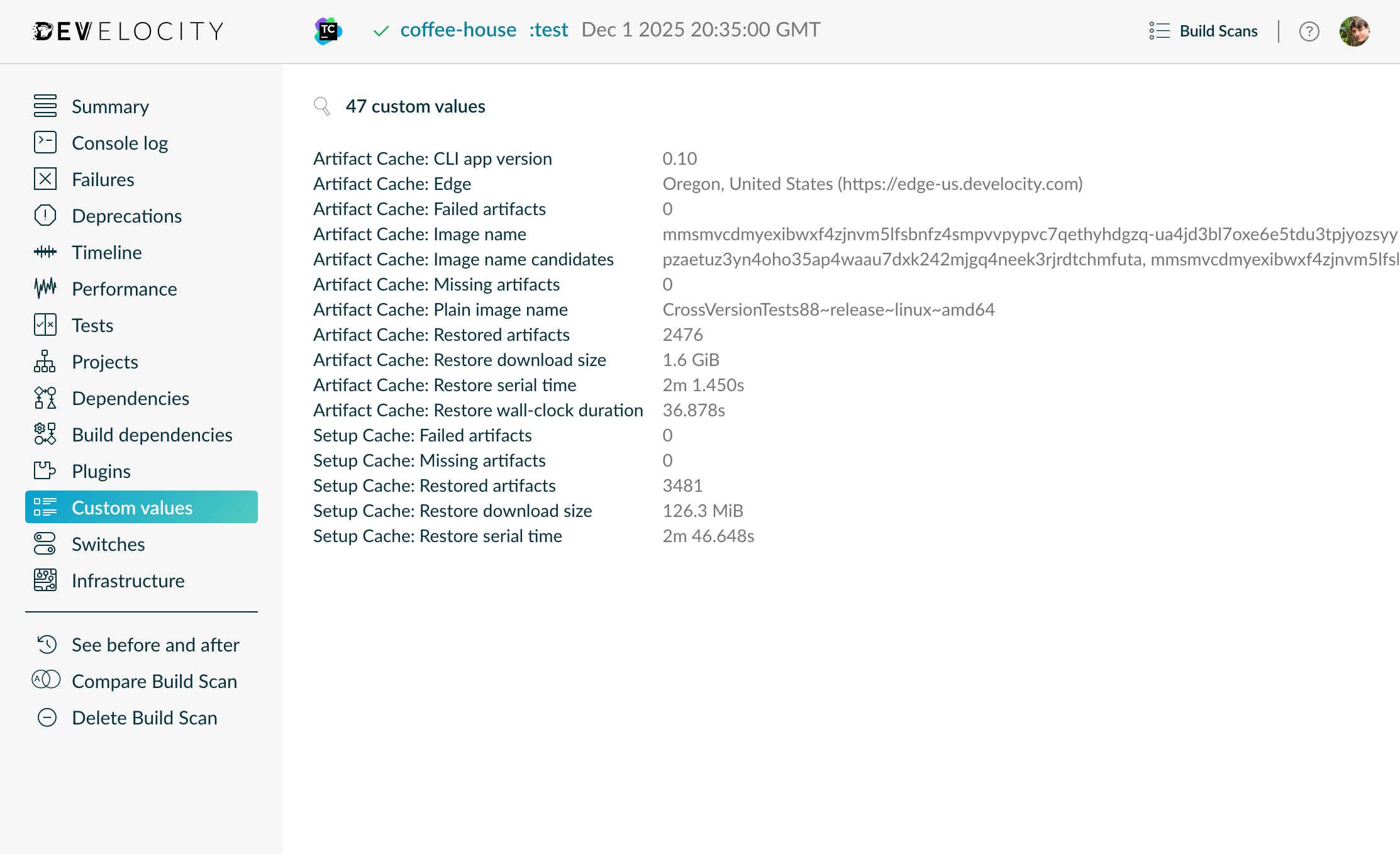
Example Build Scan with Artifact Cache and Setup Cache reporting
> [!TIP]
> The "Artifact Cache: Restore wall-clock duration" value is the total duration of the restore phase from both the Artifact Cache _and_ Setup Cache.
### Develocity Reporting and Visualization
The "Dependency Caching" dashboard in Develocity Reporting and Visualization provides an overview of the ratio of dependencies downloaded versus resolved from the local cache, across all projects and builds. The dashboard supports Gradle and Maven builds running locally and on CI, and detects cached dependency files regardless of the caching solution used. When Artifact Cache is enabled, the visualizations display the actual reduction in dependency downloads achieved by the feature. The dashboard includes filters by build tool, project, and tags to enable in-depth analysis of caching performance.
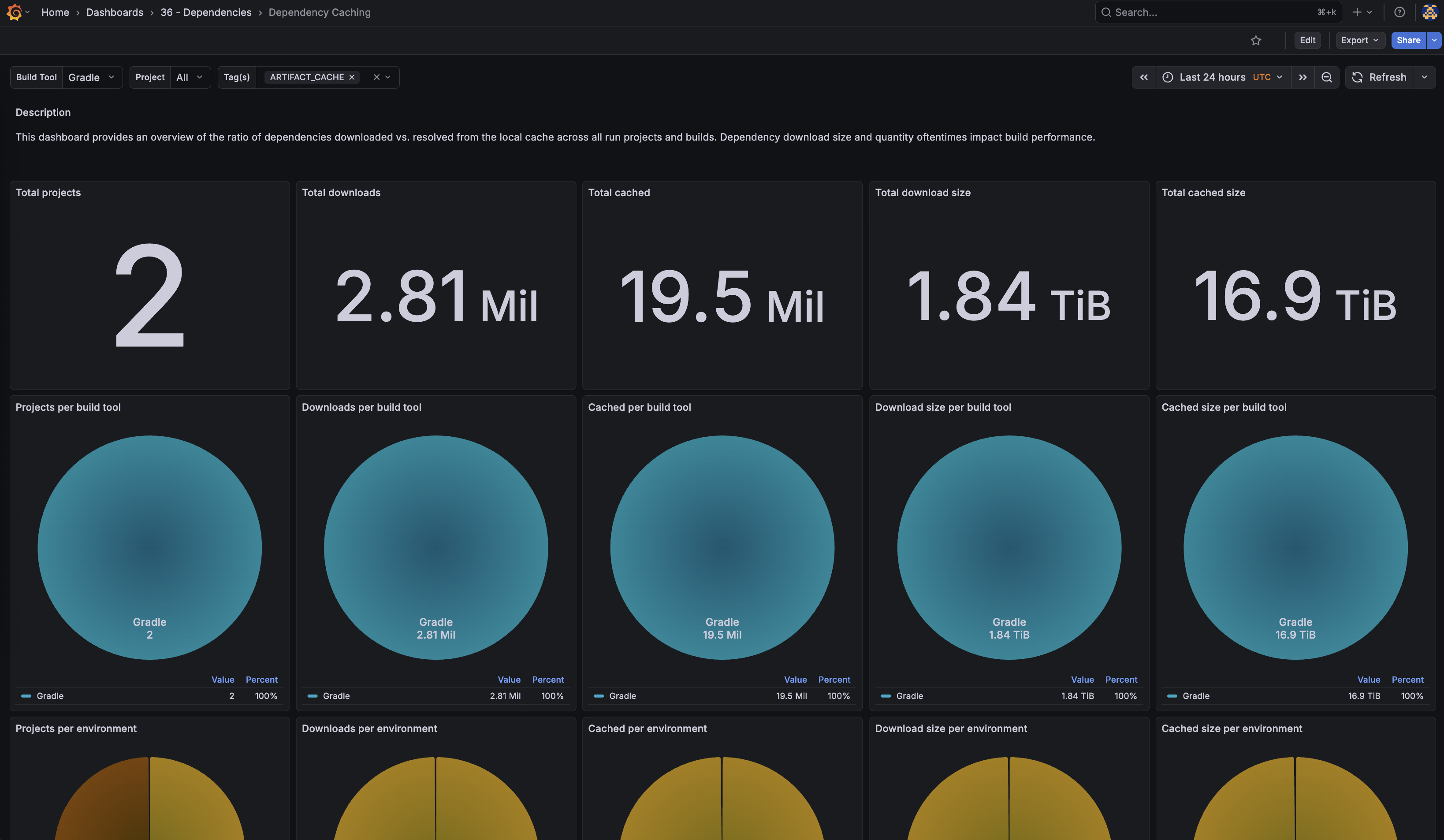
Dependency Caching Dashboard
> [!NOTE]
> The "Dependency Caching" dashboard requires Develocity 2026.1 and Develocity Gradle plugin 4.4.0 or Develocity Maven extension 2.4.0.
### Develocity Artifact Cache and Setup Cache Service Monitoring
The Develocity Artifact Cache and Setup Cache service exposed by Edge nodes can be monitored by following the [Monitoring section](https://docs.gradle.com/develocity/edge/2.1/#edge-monitoring) of the Develocity Edge User Manual.